CI/CD Pipeline for Solo Developers: Go + GCP + GitHub Actions
I run Amida-san (amida-san.com), a web service with 20,000+ users, as a solo developer. The backend is written in Go and deployed on GCP.
In the age of AI, building a working service has become easier than ever. However, delivering a stable, high-quality experience to users requires more than just shipping code. When you’re the only developer, you’re also the only one who notices when things break. That’s why a solid CI/CD pipeline is essential—it keeps the development-to-deployment loop fast and safe.
This article covers the CI/CD pipeline I built using GitHub Actions + GCP (Cloud Run, Cloud Build) + Terraform.
Code samples in this article are simplified for explanation purposes. Service names, regions, and versions have been changed from actual values.
Tech Stack
| Category | Technology |
|---|---|
| Language | Go |
| Framework | Gin |
| Infrastructure | GCP (Cloud Run, Cloud SQL, Secret Manager, Artifact Registry) |
| IaC | Terraform |
| CI/CD | GitHub Actions + Cloud Build |
| Security Scanning | Trivy, gosec |
| Notifications | Discord Webhook |
Architecture Overview
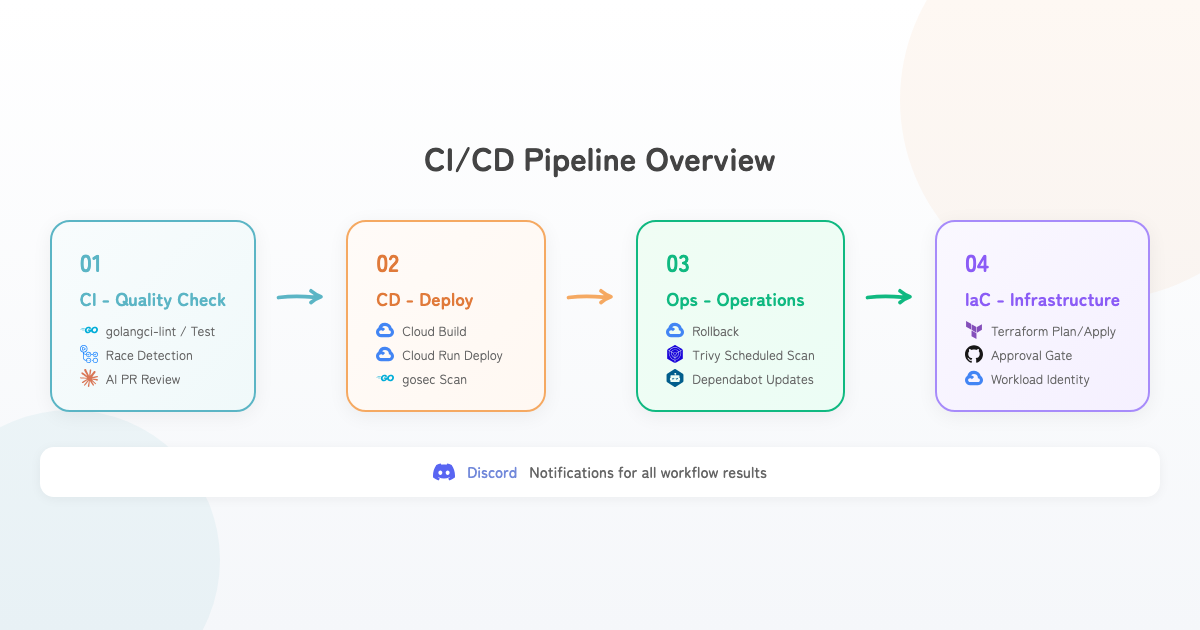
CI Pipeline
Automated Quality Checks
Every push and PR to main triggers the following checks automatically:
name: CI
on:
  push:
    branches: [main]
  pull_request:
    branches: [main]

jobs:
  test:
    runs-on: ubuntu-latest
    steps:
      - uses: actions/checkout
      - uses: actions/setup-go

      - name: Generate mocks
        run: make mocks

      - name: Run golangci-lint
        uses: golangci/golangci-lint-action

      - name: Run tests
        run: go test -v -race -coverprofile=coverage.out ./...

      - name: Build
        run: go build -v ./...
Key points:
-raceflag detects data races—essential for Go’s concurrent patterns- golangci-lint for static analysis with customizable rules via
.golangci.yml - mockgen auto-generates mocks in CI, ensuring test reproducibility
AI-Powered PR Reviews
When a PR is created, both Claude and Gemini automatically review the code. Using two different AI models provides diverse perspectives, maintaining review quality even as a solo developer.
Dependabot for Dependency Updates
Five ecosystems are automatically updated on a regular schedule:
updates:
  - package-ecosystem: "gomod"
  - package-ecosystem: "docker"
  - package-ecosystem: "github-actions"
  - package-ecosystem: "terraform"
  - package-ecosystem: "npm"
This covers Go, Docker, GitHub Actions, Terraform, and npm—no layer left behind.
CD Pipeline - Deployment Strategy
Why Manual Triggers?
For solo projects, auto-deploying on merge to main is common. I chose manual triggers (workflow_dispatch) instead, for several reasons.
First, coordinating infrastructure and application changes. For example, DB schema changes and app deploys often need a specific order—“add the column first, then deploy the app.”
Second, release tags make it clear which codebase is running in production. When incidents happen, you can immediately identify the exact code version.
And honestly, pressing the deploy button gives you a moment of “okay, let’s do this”—a small but real psychological benefit.
Release Tag Convention
Release tags follow the YYYYMMDDB format (e.g., 20250703b). The trailing letter (a, b, c…) handles multiple same-day releases. The date-based format makes it instantly clear when the deployed code was cut.
Deployment Flow
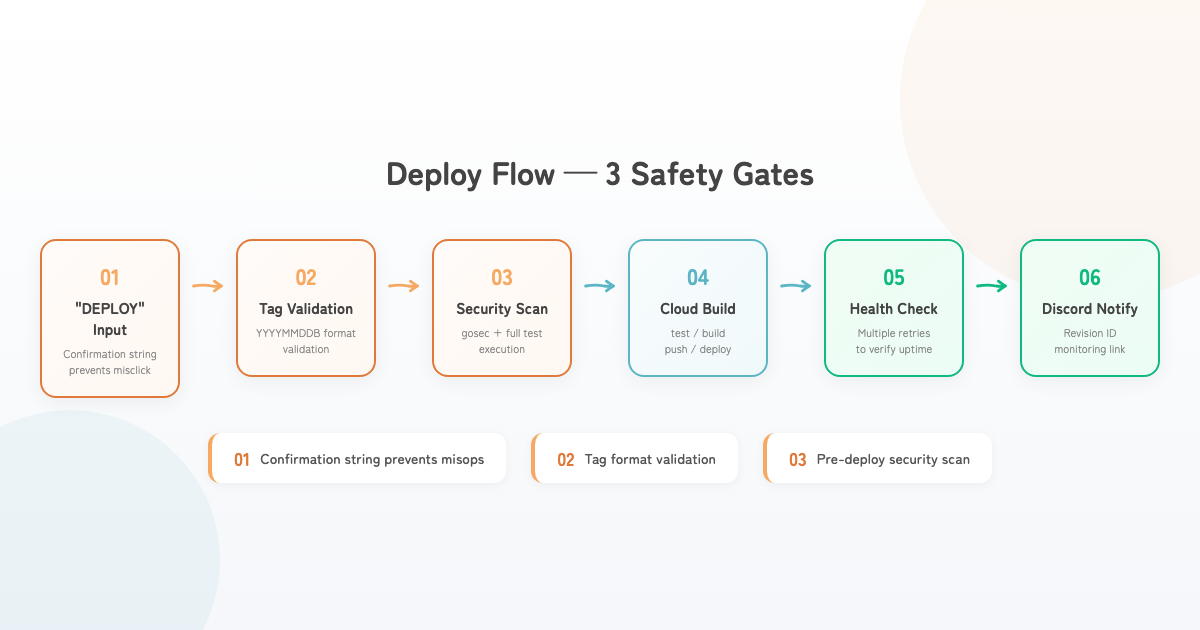
The deployment workflow has three safety mechanisms:
on:
  workflow_dispatch:
    inputs:
      deployment_type:
        type: choice
        options: ["full", "restart"]
      release_tag:
        description: "Release tag (YYYYMMDDB format)"
      confirm_production:
        description: 'Type "DEPLOY" to confirm'
Three Safety Guards:
- Confirmation string “DEPLOY” — prevents accidental clicks
- Tag format validation — rejects anything not in
YYYYMMDDBformat - Pre-deploy security scan — gosec vulnerability check + full test suite
Cloud Build Pipeline
steps:
  - id: "test" # Run Go tests
  - id: "build" # Build Docker image
    waitFor: ["test"]
  - id: "push" # Push to Artifact Registry
  - id: "deploy" # Deploy to Cloud Run
  - id: "traffic" # Switch traffic (LATEST=100%)

timeout: "1200s"
Test → Build → Push → Deploy → Traffic switch, executed sequentially via waitFor.
Production Dockerfile
# Build stage
FROM golang:x.xx-alpine AS builder
WORKDIR /app
COPY go.mod go.sum ./
RUN go mod download
COPY . .
RUN CGO_ENABLED=0 GOOS=linux go build -o main .

# Runtime stage
FROM alpine:x.xx
RUN adduser -D appuser
WORKDIR /home/appuser
COPY --from=builder /app/main .
USER appuser
CMD ["./main"]
Security measures:
- Multi-stage build minimizes image size
- Non-root user (appuser) for runtime execution
- CGO_ENABLED=0 for static linking with zero external dependencies
Service Restart (Redeploy Without Code Changes)
When Secret Manager secrets are updated, you may need a new revision without code changes:
gcloud run services update <service-name> \
  --region=<region> \
  --update-annotations=restart-timestamp=$(date +%s)
Just select the restart type to pick up new secrets.
Rollback Strategy
A dedicated rollback workflow enables immediate recovery during incidents:
on:
  workflow_dispatch:
    inputs:
      rollback_target:
        type: choice
        options: ["previous-revision", "specific-revision"]
      revision_id:
        description: "Specific revision ID"
      confirm_rollback:
        description: 'Type "ROLLBACK" to confirm'
Two rollback modes:
- Previous revision — instantly revert to the last stable version
- Specific revision — specify a revision ID from the deploy notification
Leveraging Cloud Run’s revision management, rollback is just a gcloud run services update-traffic call. No rebuild needed—rollback completes in seconds.
Post-rollback health checks (with retries) and Discord notifications confirm recovery.
Infrastructure as Code - Terraform
Module Structure
terraform/
├── environments/<env>/
│   ├── main.tf
│   ├── variables.tf
│   ├── outputs.tf
│   ├── providers.tf
│   └── terraform.tfvars
└── modules/
    ├── cloud-run/       # Cloud Run service
    ├── cloud-sql/       # Database
    ├── auth/            # Authentication
    ├── secret-manager/  # Secret management
    ├── billing/         # Budget alerts
    └── monitoring/      # Monitoring config
Every GCP resource—Cloud Run, Cloud SQL, Firebase, Secret Manager, billing, monitoring—is managed through Terraform.
Plan/Apply Separation with Approval Gates
- Plan and Apply are separate workflows. Review the diff from Plan, then execute Apply
- Apply requires GitHub Environment
productionapproval - Local
terraform applyis prohibited. Only GitHub Actions can apply changes
Workload Identity Federation
- name: Authenticate to Google Cloud
  uses: google-github-actions/auth
  with:
    workload_identity_provider: ${{ secrets.WIF_PROVIDER }}
    service_account: ${{ secrets.SA_EMAIL }}
Instead of storing service account keys (JSON) in GitHub Secrets, Workload Identity Federation uses OIDC authentication. This eliminates key rotation and leakage risks entirely.
Security
This project uses gosec and Trivy at different stages for different purposes:
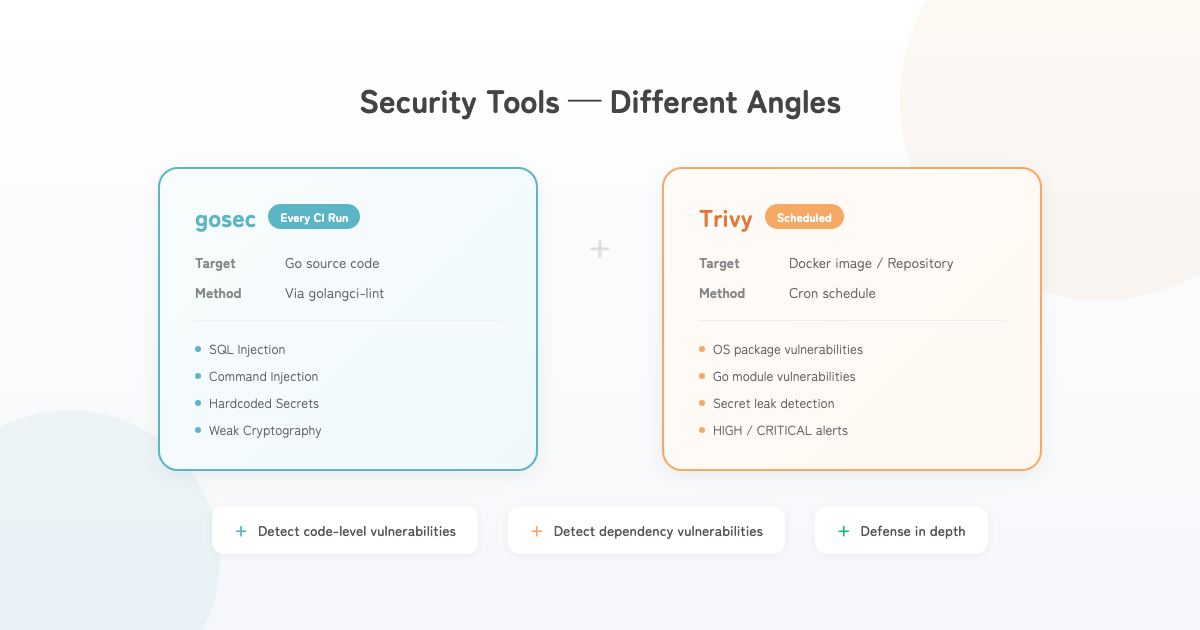
| Tool | Target | When | What it detects |
|---|---|---|---|
| gosec | Go source code | Every push/PR (CI) | Code-level vulnerabilities |
| Trivy (image) | Built Docker image | Scheduled | Known CVEs in OS packages |
| Trivy (filesystem) | Entire repository | Scheduled | Known CVEs in Go modules, secret leaks |
gosec - Static Security Analysis
gosec runs via golangci-lint on every CI run. It detects issues like:
- SQL injection (string concatenation in queries)
- Command injection (
os/execwith external input) - Hardcoded secrets (passwords/tokens in code)
- Weak cryptographic algorithms (MD5, SHA1)
- Insecure TLS configurations
Trivy - Scheduled Vulnerability Scanning
name: Security Scan
on:
  schedule:
    - cron: "..." # Scheduled

jobs:
  trivy-image-scan:
    steps:
      - run: docker build -t app:latest .
      - uses: aquasecurity/trivy-action
        with:
          image-ref: "app:latest"
          exit-code: "1"
          severity: "HIGH,CRITICAL"

  trivy-fs-scan:
    steps:
      - uses: aquasecurity/trivy-action
        with:
          scan-type: "fs"
          exit-code: "1"
          severity: "HIGH,CRITICAL"
Trivy checks whether libraries and OS packages contain known vulnerabilities—even if your own code is clean. It runs on a schedule rather than every CI run to keep feedback loops fast. Docker image builds and scans are time-consuming, and dependency vulnerabilities don’t change with daily development. HIGH/CRITICAL findings trigger immediate Discord notifications.
No code reaches production without passing gosec + tests during deployment.
Monitoring & Notifications
All CI/CD workflow results (deploy, rollback, Terraform apply, security scans) are sent to Discord. Deploy notifications include revision IDs and monitoring links, ensuring all necessary information is available during incidents.
For the monitoring and observability setup (structured logging, GCP Cloud Monitoring dashboards, error alerts, admin web app), see the companion article: Monitoring & Observability for Solo Developers.
Conclusion
Building this level of CI/CD as a solo developer delivers three key benefits:
- Deploy with confidence — tests, static analysis, and security scans run before every deploy, with instant rollback available
- Lower operational overhead — automation handles routine tasks (dependency updates, security checks)
- Production-grade reliability — maintain the same quality processes as team-based development
Setting up this CI/CD infrastructure took significant effort. But once the foundation is in place, the ongoing cost of worrying “is anything broken?” drops dramatically. The investment pays for itself in sustained peace of mind.
In the AI era, building something that works is easier than ever. But keeping it running reliably is a different challenge entirely—quality gates, safe deploy/rollback mechanisms, continuous security checks. These are the things worth investing in as an engineer.