Claude Code: Personal Practical Notes
Introduction
Claude Code is a CLI tool provided by Anthropic that lets you delegate coding tasks to Claude directly from the terminal.
How Much Code Can It Write?
In my experience, if your codebase and design are solid, Claude Code generates code at a satisfying level.
Transformers generate the next token based on existing context (the codebase and CLAUDE.md). If the existing codebase is poorly written, it generates poorly written code. If you prepare a well-organized codebase and clear rules, you get quality that matches.
It’s a tool that excels at obediently and rapidly propagating patterns, which means the weight of human knowledge and every small decision becomes amplified. If you leave a sloppy codebase unattended, the mess spreads rapidly.
Human engineers have an innate drive toward maintainability and a professional ethic of “not cutting corners.” LLMs don’t have that intrinsic motivation. Ownership of quality must remain with the human.
In my recent personal projects, 99% of code is written through Claude Code. By combining rule enforcement via CLAUDE.md with design through plan mode, I can develop at high speed while maintaining architectural consistency.
Development Flow
Typical Workflow
1. Maintain CLAUDE.md
2. For major features or design decisions, create a discussion doc in docs/todo
3. Request design in plan mode
4. Review and approve the plan, then let it implement
5. Iterate: review -> fix
6. Sync documentation with /sync-docs
7. Git commit
1. Maintain CLAUDE.md
Before starting a new project or feature, I make sure CLAUDE.md is up to date. This helps Claude correctly understand the project’s structure and conventions.
2. Create Discussion Documents (for Major Changes)
When design decisions involve trade-offs or require comparing multiple options, I create a discussion document in docs/todo/ before proceeding.
# Prompt example
"I want to discuss state management strategy. Summarize the options and comparisons in docs/todo/state-management.md"
By organizing thoughts in a document before entering plan mode, design rationale is preserved and easier to review later.
3. Request Design in Plan Mode
Rather than jumping straight into implementation, having Claude design first in plan mode tends to produce better results.
# Prompt example
"I want to add XXX feature. Please make a plan first."
In plan mode, Claude explores the codebase and proposes an implementation approach.
4. Review and Approve the Plan
Review the proposed plan and approve it if it looks good. Provide feedback if changes are needed. After approval, Claude writes the code. It may ask questions along the way, which you answer as needed.
5. Review and Fix Iterations
I don’t stop at a single review. I iterate multiple times until I’m satisfied.
# Claude review
/review-diff

# Request fixes if issues are found
"Fix the XXX part"

# Review again
/review-diff
I also check diffs visually in my editor. It’s safer to combine Claude’s review with a human eye check.
If the implementation feels off, it’s often faster to git checkout . and start fresh rather than patching. Since regeneration cost is low with Claude Code, I find it’s better to discard aggressively than to cling to a mediocre implementation.
6. Sync Documentation
Once the implementation is stable and ready to commit, I update the documentation.
/sync-docsThis keeps related documentation in sync with code changes.
7. Commit
I commit with regular git commit. You can ask Claude Code to generate commit messages, but the commit itself is a normal git operation.
Frequently Used Commands
| Command | Purpose |
|---|---|
/review-diff | Review current diff (custom command) |
/sync-docs | Update docs to match code changes (custom command) |
/clear | Clear context and start a fresh conversation |
/review-diff and /sync-docs are custom commands defined in .claude/commands/. Claude Code lets you create project-specific slash commands.
Whenever I notice I’m repeating the same kind of request, I proactively extract it into a custom command. They’re just Markdown files with no dependencies, so they’re easy to create.
Prompting Tips
Be Specific
# Bad
"Build a login feature"

# Good
"Add an email/password login feature.
 - API endpoint: POST /api/auth/login
 - Return a JWT token on success
 - Return appropriate status codes on error"
Provide Context
# Specify files
"Add a dark mode toggle button to @src/components/Header.tsx"

# Reference existing implementations
"Create a ProductList component following the same pattern as @src/components/UserList.tsx"
Use Domain-Specific Vocabulary
Since LLMs process meaning in embedding space, I find that using precise software engineering terminology conveys intent more accurately than vague everyday language.
# Bad
"Implement it simply"

# Good
"Implement following YAGNI and KISS principles"
# Bad
"Organize it nicely"
# Good
"Separate responsibilities by layer following Separation of Concerns (SoC)"Words like “simple” and “clean” are open to broad interpretation, while terms like “YAGNI,” “KISS,” “SoC,” “DRY,” and “Single Responsibility Principle” have narrow definitions, leading to less output variance.
Include the Reason
Adding “why” alongside “what” helps Claude make better-informed decisions.
# Bad
"Memoize this function"

# Good
"This function is called on every render and has become a performance bottleneck. I want to memoize it to reduce recalculation"
When you provide the reason, Claude sometimes suggests related optimizations or chooses a more appropriate approach.
Proceed Incrementally
Requesting changes in small units tends to produce higher quality than asking for massive changes at once.
1. "First, define the data model"
2. "Next, implement the repository layer"
3. "Create the UI components"
Writing CLAUDE.md
Minimum Recommended Content
# CLAUDE.md

## Development Commands

npm run dev # Start dev server
npm run build # Build
npm run lint # Run lint
npm run test # Run tests

## Architecture Overview

(Directory structure and layer architecture)

## Development Rules

(Coding conventions and notes)

## Tech Stack

(List technologies used)
Key Points
- Explicitly state rules you want Claude to follow (e.g., “Respond in English,” “Follow YAGNI principle”)
- Including build/lint commands allows Claude to run them automatically after changes
- Writing an architecture overview helps Claude place code in the right locations
What Humans Should Own
While Claude Code can handle a lot, here are areas where I believe humans should take responsibility.
Architecture and Directory Structure
Humans should decide the project’s layer structure and directory layout. Claude places code according to what’s written in CLAUDE.md, so if that’s not well-maintained, code ends up in unintended locations.
Keep Documentation Current
I keep CLAUDE.md and docs/ up to date to prevent drift from the implementation. Claude trusts the documentation, so stale information leads to incorrect decisions.
Make Design Trade-off Decisions
Trade-offs like performance vs. readability or flexibility vs. simplicity are decisions I make as a human. I can ask Claude to compare and organize options, but the final call should be human.
Review for Design Intent Compliance
Verifying that Claude-generated code follows the decided architecture and design intent is better done by humans. Specifically:
- Is the layer structure respected? (e.g., no direct references from presentation to infrastructure layer)
- Does it follow naming conventions and coding standards?
- Is it consistent with existing design patterns?
In addition to Claude’s review via /review-diff, I open diffs in my editor for a visual check. Architecture violations in particular can be missed by Claude, so a human check adds confidence.
Parallel Workflow
Approach
I don’t use worktrees. I work in a single workspace. I tried using worktrees to edit multiple branches simultaneously, but the cognitive load of tracking which changes were in which tree was too high.
Instead, I use iTerm2 pane splitting to run multiple Claude Code sessions in parallel. With iTerm2’s transparency setting, I position VS Code behind it so I can see diffs in real-time while working in Claude Code.
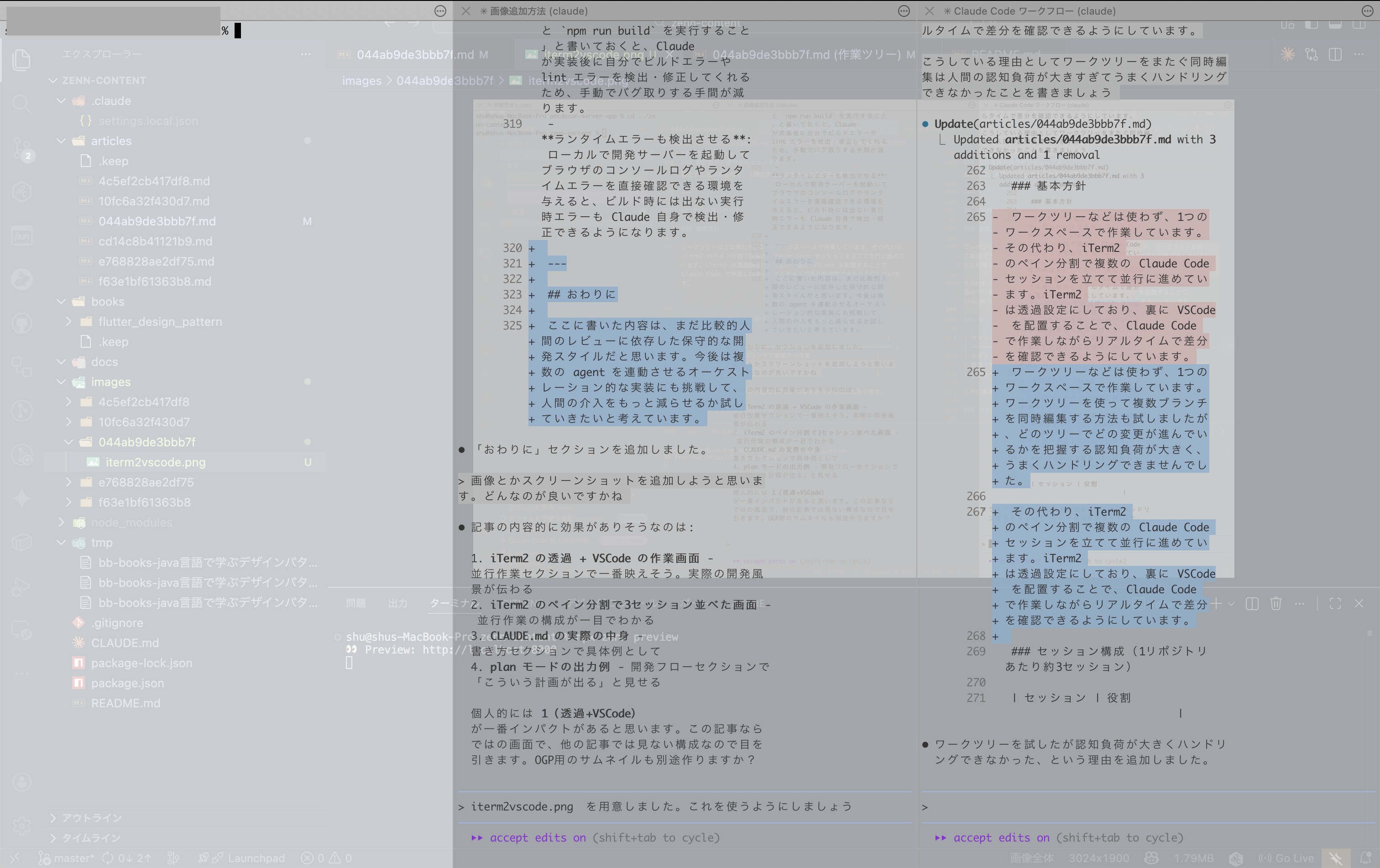
Session Layout (~3 Sessions per Repository)
| Session | Role |
|---|---|
| Main | Current branch implementation |
| Research/Plan | Investigation and plan creation for next branch |
| Review | Review of completed code |
I sometimes add lightweight tasks like documentation cleanup on top of these.
Scaling Across Repositories
Since I separate frontend and backend repositories, the above structure exists for each. That means roughly 6 concurrent sessions in total.
Conflict Control
When multiple sessions implement in the same repository, I ensure they don’t touch overlapping files. Since I know the target files from the plan mode stage, I allocate responsibilities between sessions at that point.
MCP Server Configuration
MCP Servers I Use
I find it’s best to keep MCP servers to a minimum. Too many consume context and seem to reduce accuracy.
| MCP Server | Purpose |
|---|---|
| Serena | Codebase symbol analysis, semantic editing |
| Context7 | Reference latest library documentation |
| Playwright | Browser automation and E2E testing for frontend |
Playwright is only enabled for frontend development projects.
Tips and Notes
- Actively request web searches and documentation checks: For library usage or latest API specifications that may be outdated in Claude’s training data, I include prompts like “Check the official documentation” or “Search the web for latest info.” With MCP servers like Context7, Claude sometimes references documentation proactively.
- Enforce build/lint via CLAUDE.md: Writing “Always run
npm run lintandnpm run buildafter changes” in CLAUDE.md makes Claude detect and fix build/lint errors on its own, reducing manual debugging. - Detect runtime errors too: Giving Claude access to a local dev server where it can check browser console logs and runtime errors enables it to detect and fix issues that don’t surface at build time.
- Stay close to defaults: Since Claude Code evolves rapidly, I avoid over-customizing with bespoke workflows. For example, features like subagents may eventually get folded into the default plan mode. Riding the tool’s natural evolution keeps maintenance costs low and maximizes benefits.
Recommended Reading
I recommend O’Reilly’s Prompt Engineering for LLMs. Written by a GitHub Copilot developer, it helps you understand how LLMs think. It really drives home how important CLAUDE.md and prompt tuning are, even for agents like Claude Code.
Also, building your own agent gives you firsthand experience of how dramatically output quality varies based on agent design, even with the same underlying LLM.
Conclusion
What I’ve described here is still a relatively conservative development style that relies heavily on human review. Going forward, I want to experiment with orchestrating multiple agents to see if I can further reduce human intervention.