Building a Full-Stack App with 400K GitHub Additions Solo Using Claude Code in 2025
Introduction
In 2025, I built a full-stack application with infrastructure solo with Claude Code, accumulating about 400,000 GitHub additions over two years.
This is a large-scale project for solo development. Leaving everything to AI leads to chaos. How do you design and collaborate to avoid breakdown? I’ll share the knowledge gained from two years of trial and error.
My first experience with AI development was in 2022 with GitHub Copilot’s tab completion. The experience of pressing Tab and watching code appear was astonishing. Since then, my development style has evolved along with AI tools, and now Claude Code is my main partner.
Here’s the scale of the project:
- GitHub additions (cumulative): ~400,000 (across 2 repositories)
- Current codebase: ~230,000 lines (~120,000 effective code via cloc)
- Development period: ~2 years
- Production deployments: 500+
- Users: 20,000+ (growing particularly fast in recent months)
The high cumulative additions reflect aggressive iteration enabled by AI: infrastructure migration from VPS to GCP, major refactoring with DB migrations, and rapid cycles of prototyping, discarding, and reimplementing features.
Initially, this was an experimental personal project, so I had the freedom to try various AI tools and approaches. This allowed the project to evolve as a truly AI-native development endeavor.
The tools I used evolved along with the AI development landscape:
- Early stage: GitHub Copilot tab completion
- Mid stage: GitHub Copilot agent mode
- Current: Claude Code
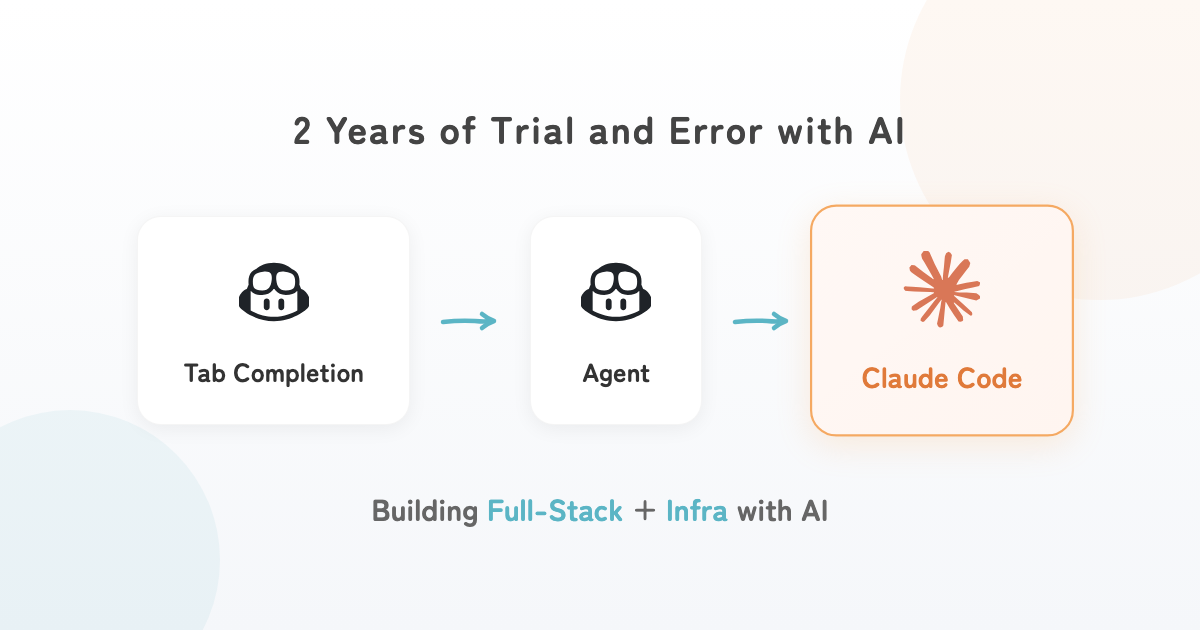
I tried other tools as well, but none led to sustained use.
What I Built: Amida-san
“Amida-san” is a service for creating online Amidakuji (Japanese ladder lottery). You share a URL, and all participants connect lines to build the Amidakuji together. Since everyone participates in the lottery process, transparency is ensured. It’s useful for situations requiring fair draws—like choosing a party organizer at work, deciding seating arrangements, assigning team responsibilities, or prize drawings.
The easiest way to understand is to try it yourself. There’s a sample available, so you can test it even alone!
Key Features
- Share URL for group participation (up to 299 people)
- No user registration required
- Fair and transparent lottery process
Technical Stack Overview
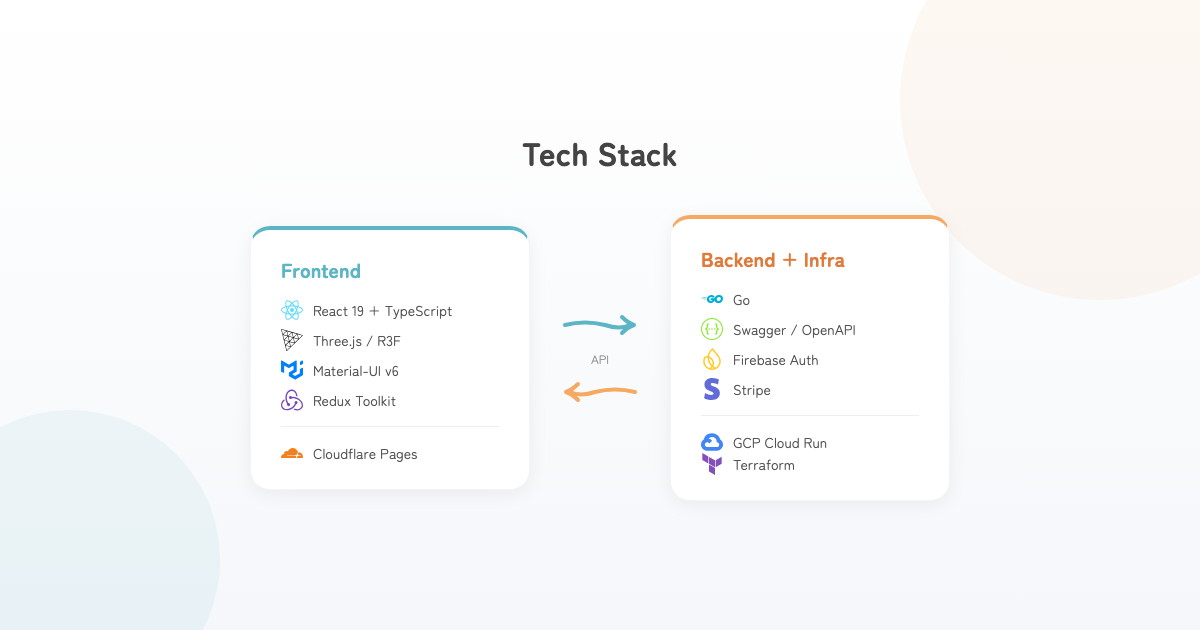
This project consists of two repositories:
- Frontend
- React web application, Cloudflare Pages hosting, Cloudflare Workers edge processing
- Backend + Infrastructure
- Go server application, GCP infrastructure built with Terraform
Evolution of AI Tools and Design Scope Changes
As AI tools evolved, the “design scope” I consider during development changed significantly.
| Tool | Design Scope | What I Focused On |
|---|---|---|
| GitHub Copilot Tab Completion | Function level | Embedding implementation intent in names |
| GitHub Copilot Agent | Use case level | Following existing patterns |
| Claude Code | Feature/Branch level | Defining requirements and specifications |
As tools evolved, I could think about design in larger units. Below, I’ll detail each era.
The GitHub Copilot Tab Completion Era
In the early development phase, I mainly used GitHub Copilot’s tab completion. When I first started using it, I remember it couldn’t complete as much code at once as it can now, and the accuracy wasn’t as high.
What I focused on during this period was program design at the function level. I was mindful of appropriate granularity and responsibilities, and naming things properly.
When trying to create functions with overly broad responsibilities, unintended features would get implemented, or code duplicating existing implementations would frequently appear within functions.
Regarding naming, names that reveal internal implementation are important. For example, if I want a function that processes in milliseconds, I name it delayMs—including Ms in the name. This is exactly the “pack information into names” principle from the book “The Art of Readable Code.” The same principles that make code readable to humans are effective for getting AI to generate appropriate code.
The scope I considered during design was: composing functions to build the entire codebase, and embedding specific implementation intent into function names.
The GitHub Copilot Agent Era
As development entered the mid-stage, GitHub Copilot began incorporating agent mode. I don’t remember the exact timing, but it was around when Cline was also gaining attention. I tried Cline too, but continued with GitHub Copilot for cost reasons.
The project state at this time:
- Basic architecture was complete
- Essential APIs were starting to come together
- Implementing features for actual use cases
What I focused on when developing with GitHub Copilot agents was whether existing implementation patterns could be followed, and for complex features, whether changes could be contained to about one file.
To make agent-driven implementation smooth, the project’s existing design matters. Because the architecture was well-organized, implementations following existing patterns went relatively well—things like data-passing implementations that were mostly just renamed. Fine details required manual fixes, but implementations that had been a burden due to sheer volume became much easier.
Conversely, using agents without organized design leads to inconsistent implementations or additions that ignore existing patterns. To maximize agent capabilities, it’s essential for humans to prepare an appropriate design foundation first.
The agent’s ability to find patterns across multiple files and actively make changes fundamentally changed the development experience.
However, I was cautious about generating complex logic. The following cases failed to produce intended implementations:
- Understanding relationships between multiple files with specific purposes
- Cases requiring efficient algorithms
For this reason, I tried to keep generation requests to roughly single-file scope. The design scope I had in mind was use-case level for a single entity.
The Claude Code Era
I started using Claude Code around spring of this year. There are other promising agent tools, but it remains my primary tool.
Since adopting Claude Code, the frequency of writing code directly in an editor has plummeted. Most of my input now goes to Claude Code instructions in the terminal.
What I focus on with Claude Code is precise requirements and specification definition. Specifically, clarifying:
- The purpose of changes in that branch
- Understanding the implementation approach and potential pitfalls
- Choices that consider trade-offs
This is one of the most challenging parts of engineering, but once you clear this, implementations come together smoothly as intended.
Claude Code has high tool maturity and good feel. Beyond basic LLM performance improvements, it excels at:
- Codebase search
- Appropriate documentation reading
- Context management experience
Using Claude Code
Organize File Structure and Architecture
This is an essential step when starting any project of reasonable scale.
AI collects information from the existing codebase and makes additions. When the codebase framework is organized:
- Context can be collected efficiently
- Appropriate implementations can be added with minimal changes
Without organization, inefficient context collection occurs and messy implementations get generated.
The frontend has a simple layered architecture. While various best practices exist, I adopted a feature-based structure. Under src, there are three main folders:
- application - Settings and configurations for the entire application
- domain - Application domain knowledge and use cases
- presentation - Logic for appearance and interactions
- src
  - application
    - config
    - state
  - domain
    - features (Redux Slice)
    - types
  - presentation
    - components
    - pages
    - hooks
    - router
The backend follows a clean architecture structure. As a design principle, I judged that strictly adhering to clean architecture would be overkill, so I simplified some DB-related implementations. It consists of three main layers:
- application - Concrete application-specific implementations
- domain - Domain and its use cases
- presentation - HTTP server routing, etc.
- pkg
  - application
    - config
    - db
    - interactors
    - repositoryimpl
  - domain
    - entity
    - usecases
  - presentation
    - handler
    - controller
Organize Documentation
Once project structure is organized, next is documentation. AI collects context and plans implementations based on documentation. This enables finding needed implementations immediately and formulating intended directions.
README.md
My README.md includes:
- Repository purpose
- Key features
- File structure
- Local run/debug instructions
- Deployment methods
- Paths to documentation
The following three are particularly important for AI development:
1. Local run/debug instructions
Enables smooth verification after AI implementation. If you write “verify debug logs after implementation” in an instruction document like Claude.md, implementation and debugging can be done in a single request.
2. Deployment methods
AI can understand where the application runs and make appropriate plans. Prevents off-target deployment suggestions after implementation.
3. Paths to documentation
I’ve become more conscious of leaving documentation for AI development. I briefly describe what files exist under the docs directory.
docs Directory
The docs structure:
- api
- business
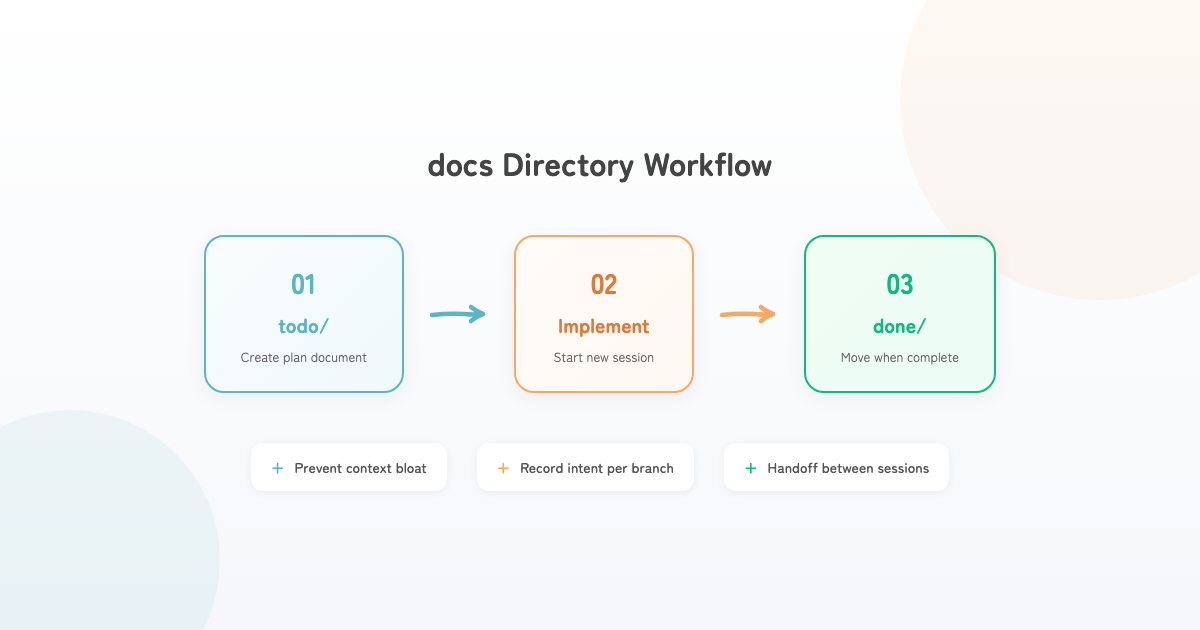
- todo
- done
- README.md
What’s distinctive is the todo and done directories. todo contains implementation planning documents. When starting any implementation, I begin by creating this todo document. Once it’s created, I start a new session for implementation, and move it to done when complete. This suppresses context bloat and preserves detailed implementation intent per branch.
Claude.md
I keep Claude.md concise at a few hundred lines. Contents include:
- Documentation writing guidelines
- Project architecture
- Implementation guidelines
- Testing guidelines
- Local run instructions
- MCP utilization
Previously, I wrote detailed specifications with concrete examples. However, I sense that not over-specifying tends to work better. Now I write as simply as possible.
What I pay attention to is using words with heavier domain knowledge.
For example, suppose I want minimal implementation without over-engineering for the future. A naive instruction would be “implement simply.”
The word “simple” is a generic word used in various everyday contexts. Imagining Word2Vec vector space, it exists in a place surrounded by miscellaneous words—a light word with weak characteristics.
On the other hand, if I write “follow YAGNI and KISS principles” for this case, these become sharper terms within the narrow field of software engineering. Using such words can steer LLM reasoning in appropriate directions with minimal context.
MCP
Various MCPs exist, but I only use these three:
Unnecessary MCPs cause context pollution. Most tool invocations are sufficient via CLI. I believe it’s best to only introduce MCPs for tools that are truly necessary and consistently high-priority.
- Serena - Semantic code search and editing tool
- Context7 - Fetch latest documentation
- Playwright - Browser automation
Development Flow
I proceed in three phases: design, implementation, and review. Here I’ll introduce the overview—detailed tool usage and specific flows will be covered in a future article.
Design Phase
When developing new features, I first consult with Claude Code on design. I use plan mode and create the aforementioned todo files while progressing through design. The quality of this design determines most of what follows. I carefully choose words, provide necessary and sufficient information, and have it gather required context.
Implementation Phase
Basically, just have it implement according to the plan. I watch the implementation in the editor, immediately press ESC to interrupt if it starts doing something unintended, or inject necessary information.
Review, Debugging, and Troubleshooting
Currently, this phase takes the most time. I read through the code AI wrote. If something’s unclear, I ask questions or request additional fixes. I also verify functionality. It still produces tricky bugs or unnatural implementations, so I can’t let my guard down. I expect this to decrease as AI evolves, so I’m handling it patiently.
Summary
In 2025, I built a full-stack application solo with Claude Code, accumulating about 400,000 GitHub additions over two years.
What I can say from this experience:
- Large-scale full-stack + infrastructure is achievable with AI development
- However, collaboration matters, not leaving everything to AI
- Human creativity and judgment remain crucial
AI coding tools have fundamentally changed the development environment. And they will continue to change.
I hope this article helps with your AI development projects! If I have time in the future, I plan to write more detailed articles about Claude Code mastery.
Bonus: Try Amida-san
Please use it when you need fair draws—like choosing a party organizer at work, assigning team responsibilities, or prize drawings.
If you have feedback or thoughts about this article or Amida-san, I’d love to hear them!